
| Best for | Small-business owners, coaches, freelancers, authors and online sellers who need marketing graphics and mockups fast |
| Probably not for | Professional designers already working in Photoshop, Illustrator or Figma |
| Type | Point-and-click design app with templates and 1-click 3D mockups; the heavier AI features sit in an optional upgrade |
| Launch price | $37 front end, one-time, during launch week (13 to 19 October 2026). The vendor says it moves to a monthly subscription after launch. |
| Our rating | 8 / 10 |
| Launch ends | 19 October 2026, 11:59 pm ET |
Most small businesses do not have a design problem. They have a time problem. You know your social posts, ads and product images should look consistent and professional, but every graphic turns into an hour in a blank editor. ClickDesigns X launched on 13 October 2026 with a simple promise: start from a ready-made design, customise it, and turn it into mockups, covers and promo graphics in a few clicks. This preview explains what it is, who it suits, what each upgrade adds and how it compares with Canva, so you can decide before the launch price ends.
What is ClickDesigns X?
ClickDesigns X is the rebuilt version of ClickDesigns, a design app from Mo Latif that first launched in 2022. It is sold through JVZoo. According to the vendor, you can start from scratch, start from a template, add your own image or upload a PDF, then customise the design and export it.
The headline feature is what the vendor calls MagicWrap: one click turns a flat design (an ebook cover, a course module, a label) into a photorealistic 3D product, such as a book, a box, a bottle or a device screen, shown from different angles or stacked into a bundle. The sales page positions this as an alternative to “AI prompt roulette”: instead of generating images from prompts, you keep control of the design and change its presentation.
Inside ClickDesigns X: first look
We now have review access, so here is what you actually see after logging in. The dashboard has a left menu for Templates, My Designs, Brands, a Scheduler and AI Generate, plus a short walkthrough video on the home screen.
The template library is split into Logos, Covers, Devices, Bundles, Socials, Marketing and Packaging. Many cover and device templates are marked 3D, so they come out as a realistic book, laptop or tablet rather than a flat image.

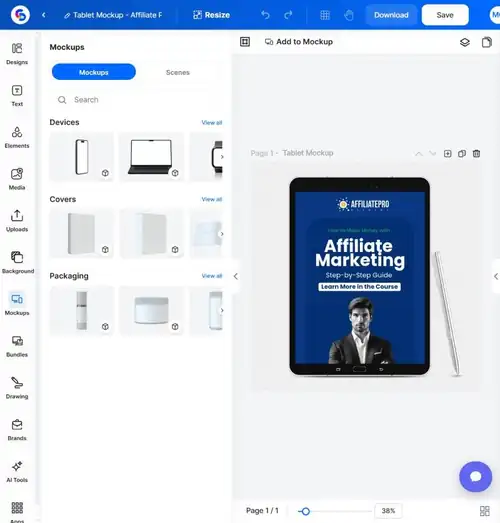
The editor opens the template on a canvas with a tool bar down the left: Designs, Text, Elements, Media, Uploads, Background, Mockups, Bundles, Drawing, Brands and AI Tools. The Mockups panel offers device, cover and packaging mockups plus ready-made scenes, and the Bundles panel adds group mockups (stacks of boxes, books, bottles and multi-device sets). There is also a Resize button for turning one design into other sizes.
Downloading is straightforward: you name the file, pick the file type and pages, choose 72, 96 or 300 DPI, pick small, medium or original size, and can add a watermark or save to a folder.

What you can make with it
- 3D mockups and bundles: ebook and Kindle covers, course modules, software boxes, lead magnets, product bundles, device screens
- Social and ad graphics: sized posts for Instagram, Facebook, Pinterest, LinkedIn and X, YouTube thumbnails, ad creatives and banners
- Store and product visuals: Shopify, Amazon and Etsy images, product boxes and labels
- Print: business cards, flyers, brochures, posters and postcards
- Branding: logos and page designs
- Commercial licence: the vendor says you can create designs for clients
Pros and cons (based on what we know so far)
- Starting from a template is much faster than a blank canvas
- One design can be reused as a mockup, a bundle, a social post and a print file
- One-time price during launch week instead of a subscription
- Commercial licence included, according to the vendor
- From our testing: designing and scheduling posts to Facebook, Instagram, LinkedIn, Pinterest and X from one place saves real time
- Five upsells in the funnel; it is easy to buy more than you need
- Template-based designs can look like other users’ unless you customise them
- After launch, the vendor says it moves to a monthly subscription
- From our testing: if you are not selling a product (for example a service business or a personal brand), you will find far fewer ready-made templates for your situation
Pricing and upgrades explained
These are the launch-week prices published by the vendor. You do not need any upgrade to start designing. Buy the front end, use it for a week, and only add an upgrade if you hit a real limit.
| Product | Price | What it adds / who needs it |
|---|---|---|
| ClickDesigns X (front end) | $37 | The core design app: templates, editor, mockups, downloads. Enough for most people. |
| Upgrade 1: Maximizer | $97 | 10,000+ more templates, premium editor, custom template designer and 1-click cloner, unlimited projects and downloads. For heavy users. |
| Upgrade 2: ClickSocials | $77 | Create, schedule and publish social posts. Only if you don’t already use a scheduler. |
| Upgrade 3: 3D Design Studio | $97 | Animated and interactive 3D mockups and custom product bundles. For product sellers and course creators. |
| Upgrade 4: Agency | $197 | Team access, custom branding, client management and white label. Only if you design for clients. |
| Upgrade 5: AI Turbo | $67 | AI-generated ad and social campaigns in every size. For people running lots of ads. |
| Bundle | $397 | Front end plus the upgrades in one purchase. The vendor advertises a $100-off coupon during launch week; check the bundle page for the current price. |
See the ClickDesigns X front end · See the full Bundle
ClickDesigns X vs Canva
Canva has a free plan, a huge template library and team features, and for many people it is enough. ClickDesigns X is aimed at a narrower job: direct-response marketing assets such as 3D product mockups, covers, bundles and promo graphics, sold as a one-time launch purchase. If you already pay for Canva Pro and use it daily, you may not need both. If your main need is making digital products look like physical products for sales pages, ClickDesigns X is built around exactly that.
My exclusive bonuses
- Bonus 1: Sell Mockups As A Service, Complete Client Kit (22 pages): offer templates, pricing worksheet, client intake and delivery checklists for turning mockups into a small paid service.
- Bonus 2: First 10 Mockups in 1 Hour (12 pages): a step-by-step playbook to create your first ten professional mockups.
How to claim: buy through any link on this page, then email your JVZoo receipt ID to support@aimeetslife.com with the subject “ClickDesigns X bonus”. We send your bonuses within 24 hours (US Eastern time). The launch offer ends 19 October 2026 at 11:59 pm ET. See our bonus terms.

FAQ
Is ClickDesigns X a one-time payment? During launch week (until 19 October 2026, 11:59 pm ET) the vendor sells it as a one-time purchase. The vendor says it switches to a monthly subscription after launch.
Is there a refund policy? Check the guarantee on the official sales page and your JVZoo receipt before you buy.
Do I need design skills? No. The idea is that you edit an existing design or apply a 1-click mockup rather than starting from scratch.
Is it an AI image generator? Not at its core. The front end is a point-and-click design and mockup tool. AI-generated ad campaigns are part of the optional AI Turbo upgrade.
Do I need the upgrades? No. Start with the front end and upgrade only if you hit a specific limit.
Our verdict: 8/10
After testing it in our own account, we give ClickDesigns X 8 out of 10. It is best for someone who already makes their graphics in Canva and wants to work faster, then push those designs to Facebook, Instagram, LinkedIn, Pinterest and X without paying for a separate scheduler like Buffer. (Social scheduling is sold as the ClickSocials upgrade during launch, so check which tier you need.)
What held it back from a higher score: the template library leans heavily towards selling products. If you run a service business or a personal brand and are not selling a product, there are far fewer templates that fit, and you will do more customising yourself.
Buy it if you sell digital or physical products, or you want design and social scheduling in one tool at a one-time launch price. Skip it if you rarely sell products and Canva already covers your needs.
Get ClickDesigns X with my bonuses
Prices and features are as published by the vendor for launch week and may change. Results vary. No income is promised or implied. AI Meets Life, support@aimeetslife.com, Michela KO, 1209 Mountain Rd Pl NE, Albuquerque, NM 87110, USA.

Written by
Oliver K.G
Oliver K.G is the founder of AI Meets Life, a publication helping US business professionals cut through the noise and apply AI where it actually matters — in their teams, workflows and bottom line. Tracking the tools, trends and decisions shaping the future of work.